For markets, stalls, food trucks and pop-ups
Pop-up checkout: sell and get paid from your phone.
Type the amount, show the QR, and the customer pays on their own phone. No terminal to charge or carry, and nothing for them to install.
No terminal · No app for your customers · On Core · Data hosted in the EU
How it works
Three taps at the stall.
Type the amount
Or pick an item you set up once.
Show the QR
The customer scans it with their own phone camera.
They pay, you see PAID
The money goes straight to your own account at the payment provider. Qruuk takes nothing from your sales.
Why it works at a stall
Nothing to charge.
- No new hardwareA printed QR code and your phone. No reader, no battery, no cable.
- Regulars come backGive a stamp with the sale and the card is on their phone. Next time they scan, you tap +1.
- Not a tillQruuk is not a cash register and keeps no stock. If you must give a receipt from a till, keep your till.
What you get
Pick what you run. See what Qruuk does for it today.
Only what works today, in the words we can prove. Plan conditions are said.
Studios and gyms
What your customers get, with no app
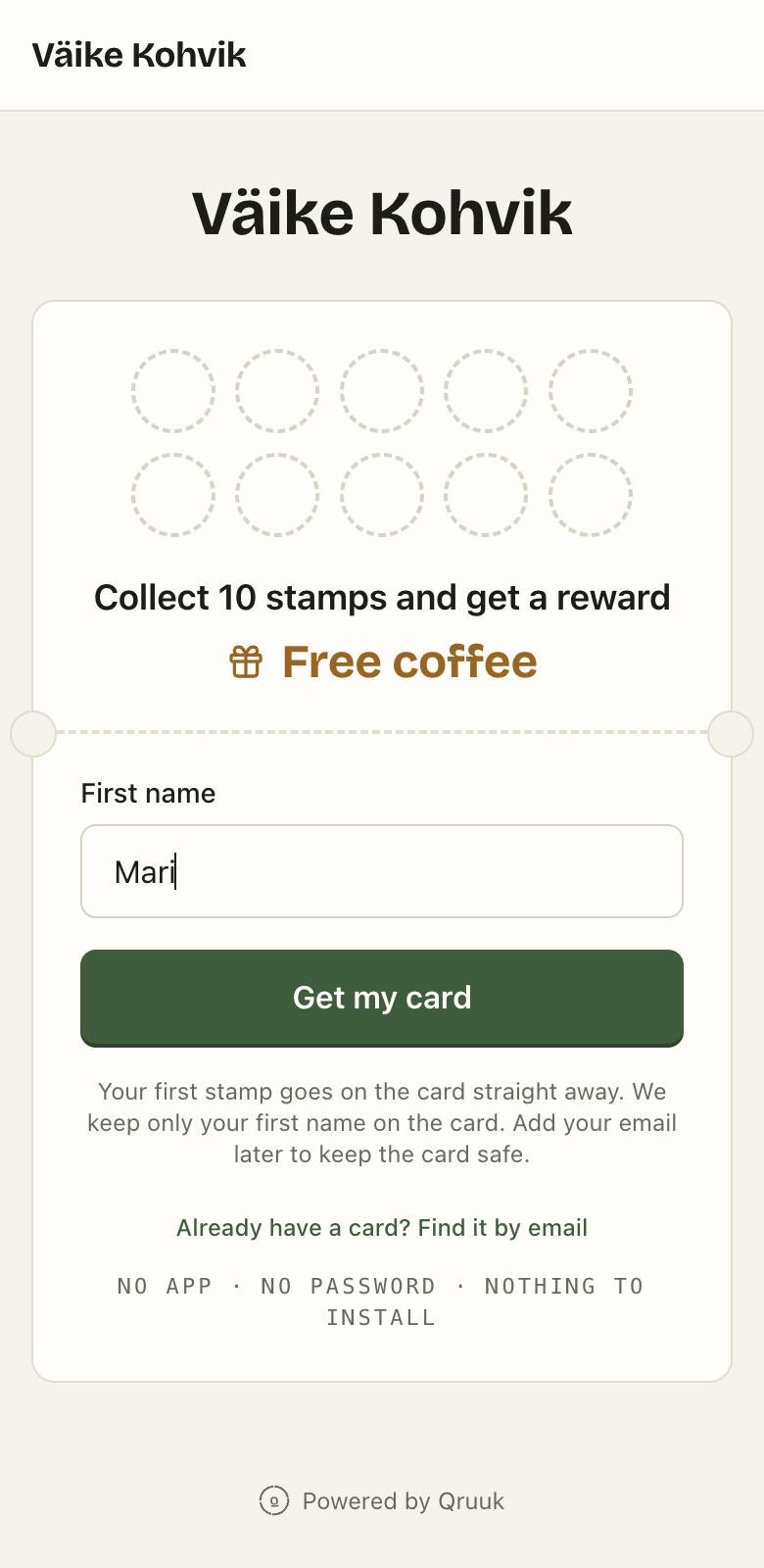 Customers type a first name. No app, no password.They scan the QR and type a first name. The card opens in the browser.
- Punch cards and memberships that count down on their own.The card says VALID, 2 LEFT or EXPIRED, and why.
- Their phone remembers the card.Next time, scanning the counter or door QR opens their own card.
- Book a place in a class from a link, with a pass or just a first name, and give it back until the class starts.The week's classes with places left, and a Book button.
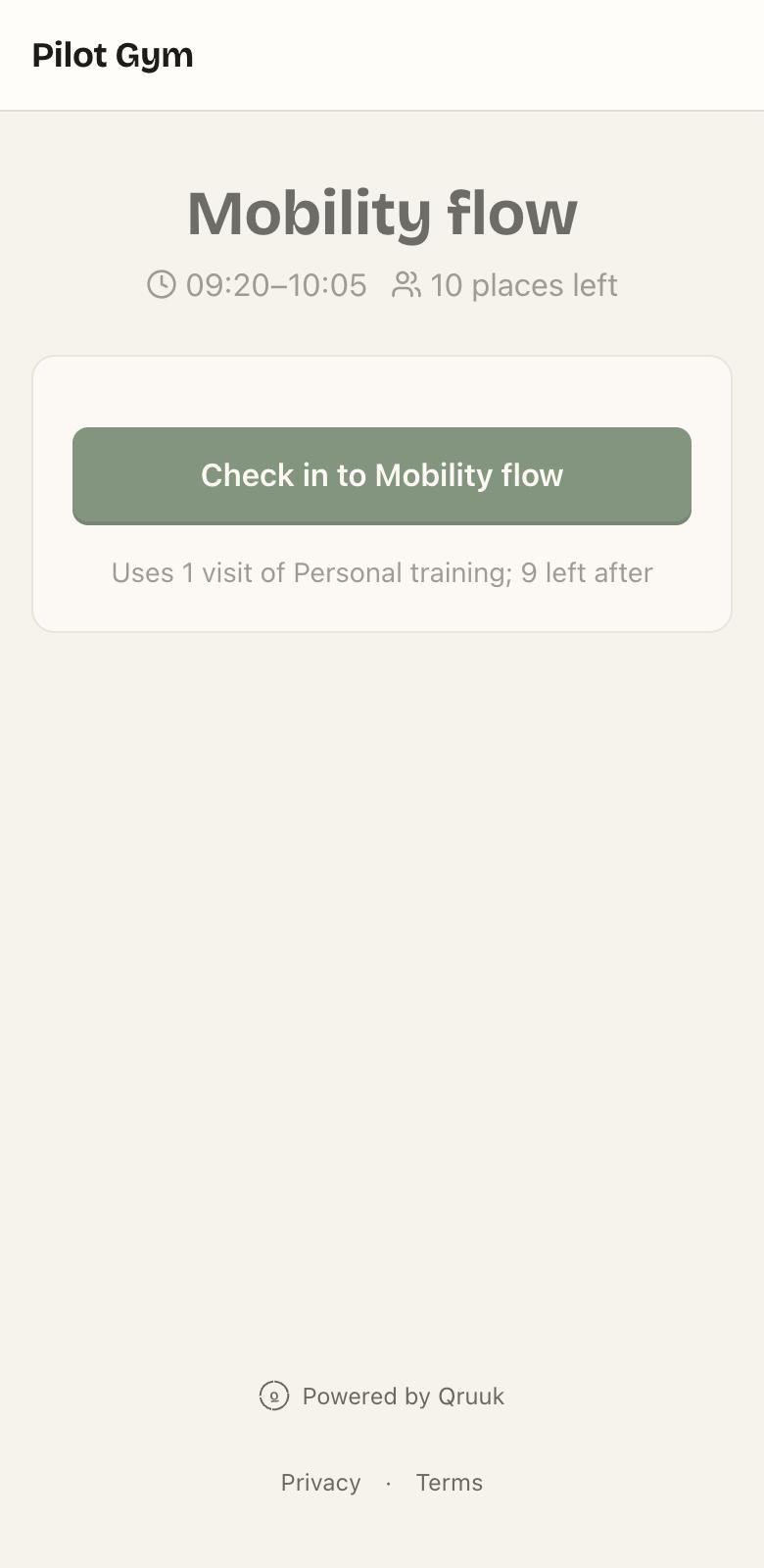 Clients check themselves in from their phone.At the door: scan the QR, press Check in, one visit comes off.
- If a class is cancelled, everyone booked who left an email is told, with a link to book another.You press Cancel on the class; the emails go out.
- In Estonian, English, German and Polish.The customer's pages follow their phone's language.
- Sell passes; clients pay on their phone. On CoreThe money goes straight to your own account at the payment provider.
- A client's card opens on their phone even with no signal, once it has been opened there before.Staff can still scan it.
Running classes
- Weekly classes that repeat eight weeks ahead, one-offs, places, a coach per class.Your week on one screen; a class is added once with its days.
- Paste your timetable the way it is written, "Mon, Wed 18:00 Yoga 60 min", and Qruuk reads it.It shows the classes it read, and any line it couldn't.
- A full class stays full. No double bookings.The last place goes to one person, even when two press Book at once.
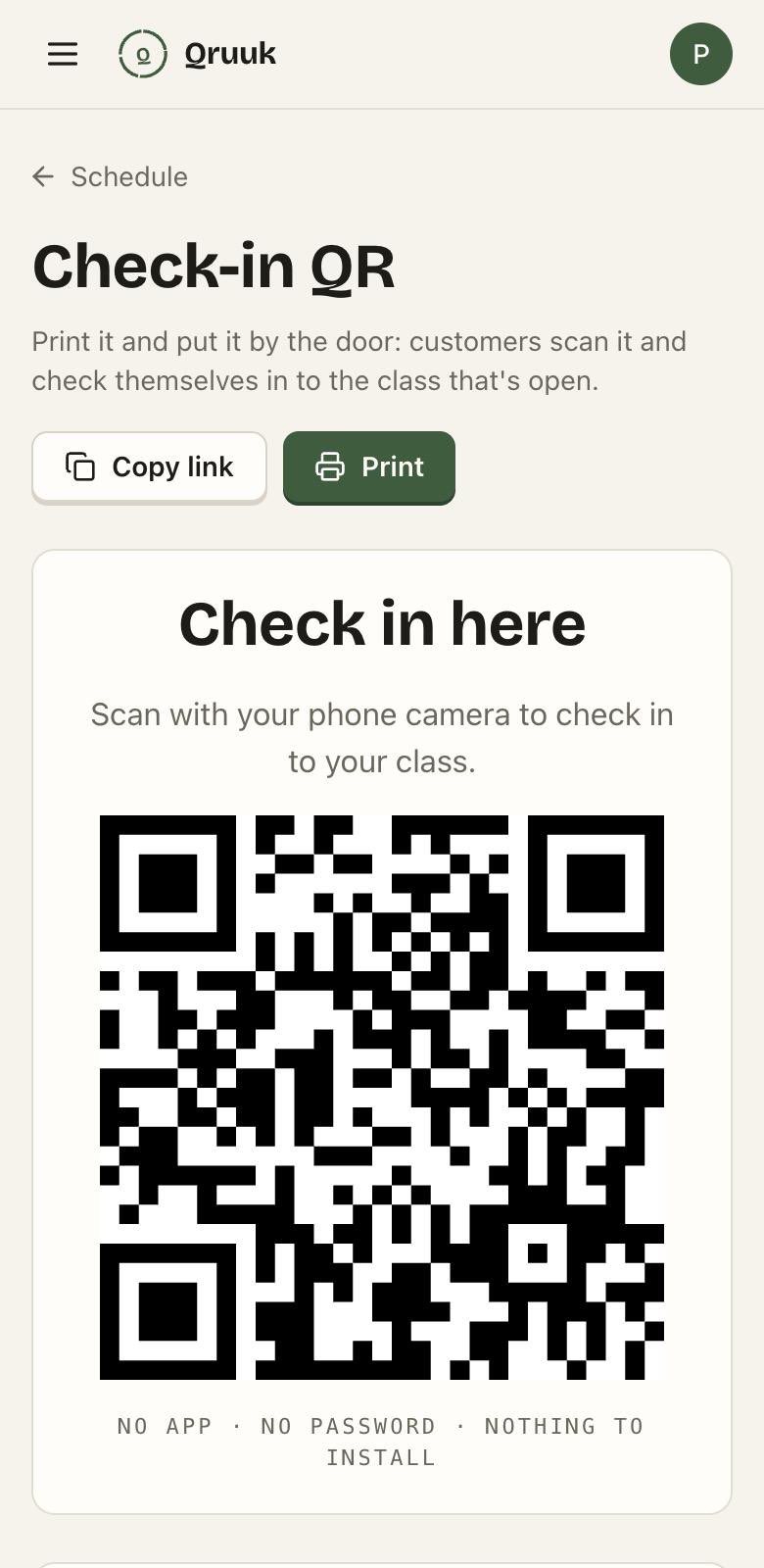 A screen by the door shows a QR that changes every 30 seconds.An old phone or tablet by the door, showing the code.
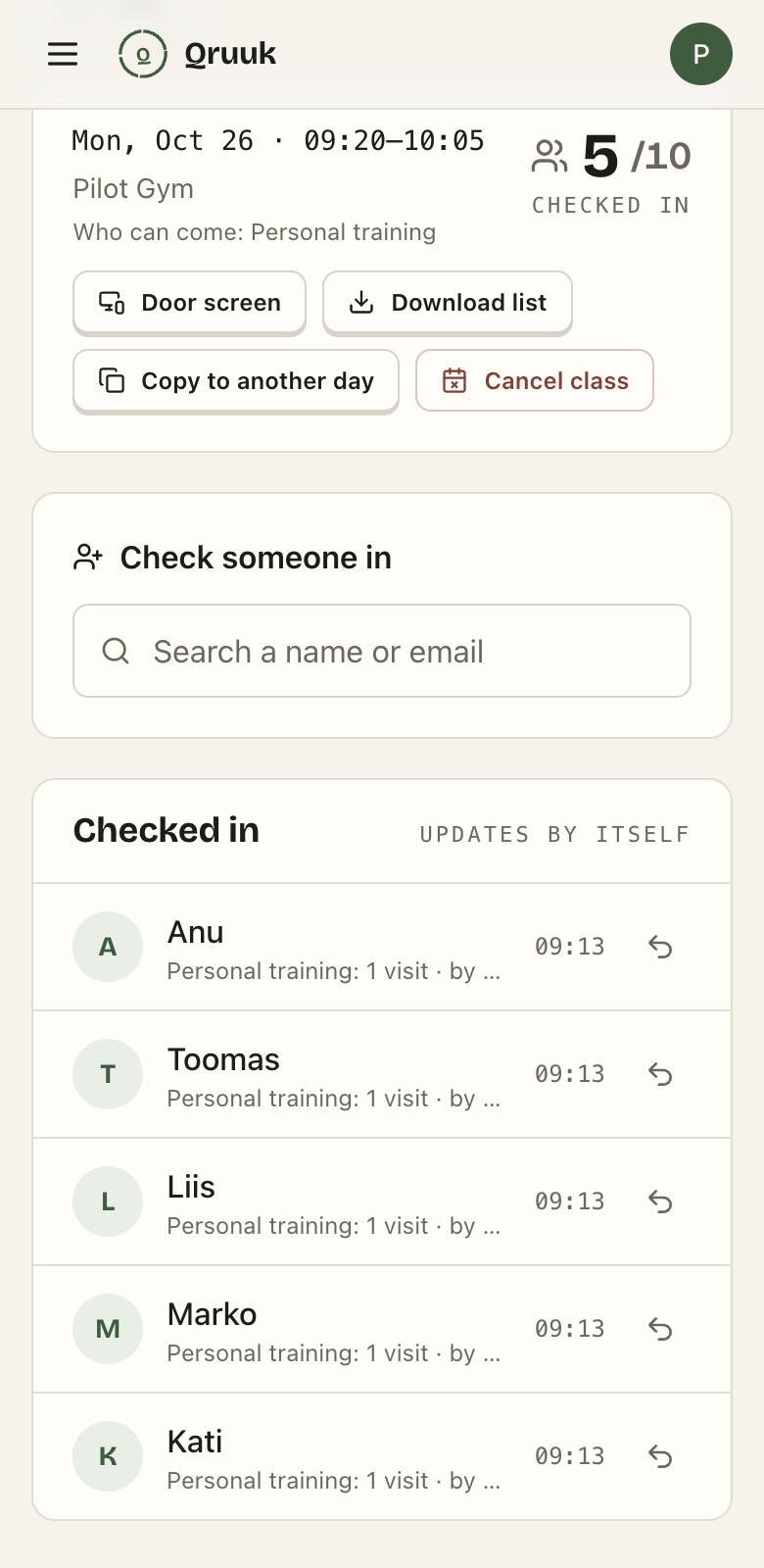 A live list of who booked and who is there, with no-shows.Names fill in as people check in; add someone by name.
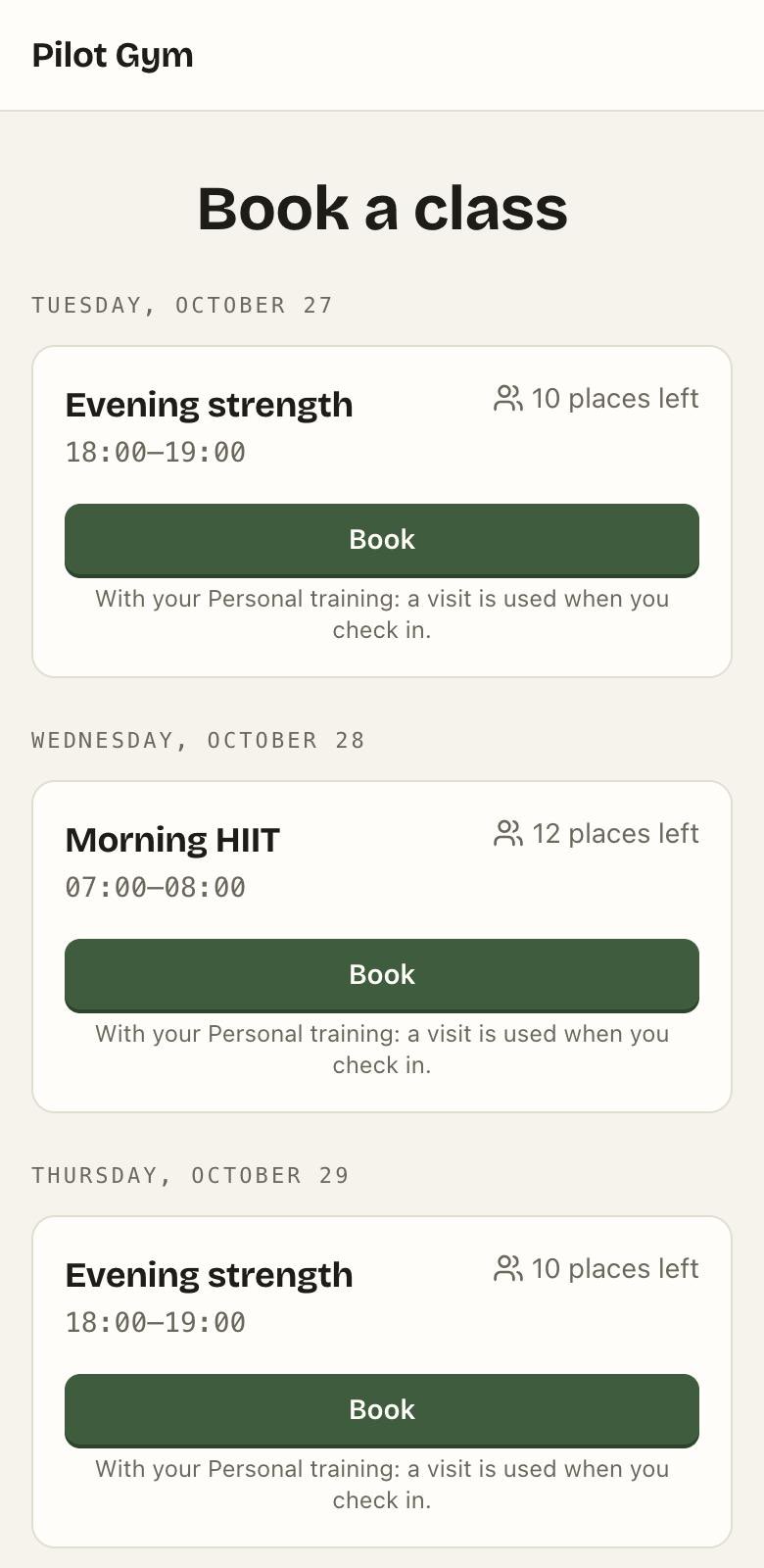 A booking page for your Instagram bio.One address for your bio, and a QR for the door.
- Your schedule and passes on your own site.Two lines of code in Wix, WordPress or Voog.
- Who taught what, and what they earned.A monthly report per coach: classes, visits, euros and their share. Download it as a CSV.
- Bring your members from a spreadsheet with the visits they have left or the date their membership runs to.Upload a CSV; their cards come with them.
At the counter
- No hardware. A printed QR code and your phone.Print the counter card from the app.
- One screen with four tabs: give a stamp, scan, find a customer, sell.Selling is on Core.
- Record a cash or already-paid sale in one tap and the pass or ticket is issued.On Core.
- Show your IBAN and a reference; the buyer says they paid; you confirm when it arrives.On Core.
- Refund a sale from the app; the refunded pass stops working.On Core.
- Your own terms and refund policy on a public page, linked from booking and payment pages.Write them once in Settings.
- No signal at the door? Scanning keeps working and each scan is checked when the connection is back, counted once.Anything that didn't go through is listed for staff.
Running the business
- Free for up to 50 new cards and 200 scans a month.At the limits new stamps and cards pause. There is never a bill.
- First stamp in about three minutes.Timed from the sign-up form to a stamp at the counter.
- Invite coaches and staff. Staff see the schedule, rosters and the Counter, not money or settings.Seats: 1 on Free, 5 on Core, 15 on Pro.
- Every cardholder in one list, with who agreed to hear from you and who has not been back in 30 days.Search by name; filter the ones who stopped coming.
- Download the customers who agreed to marketing as a CSV, each with an unsubscribe link.Qruuk does not send campaigns itself.
- An overview of QR scans and class attendance.On the app's Overview screen.
- Invite another business: when it has given three customers a card, both get 30 days of Core free.Your invite link is in Settings.
- A month's sales as a spreadsheet for your bookkeeper, with totals per day and way of paying, or every sale, and the VAT split at your rate.On Pro.
Connections and your AI assistant
- Your AI assistant can set up and run your account.Claude, ChatGPT or Cursor, with one address. You tick what it may do.
- An open API with keys, and signed webhooks to your spreadsheet, Zapier, Make or n8n.Each delivery is logged and retried.
- Every paid sale goes to Merit Aktiva by itself, as an invoice with its payment, under the same number. A refund goes as a credit note.On Pro: connect Merit Aktiva once under Settings → Accounting; each sale then shows its invoice number with a tick.
Your data
- Data is hosted on Google Cloud in Finland.You are the controller; Qruuk is the processor.
- Download everything in the account as a file, delete the account, and download or erase one client's data from their page.In Settings → Your data, and on the client's page.
What you won't get
- Calendar feeds
- One-to-one appointments
- Paying coaches: Qruuk works out the sums, you pay
Cafés and shops
What your customers get, with no app
- Customers type a first name. No app, no password.They scan the QR and type a first name. The card opens in the browser.
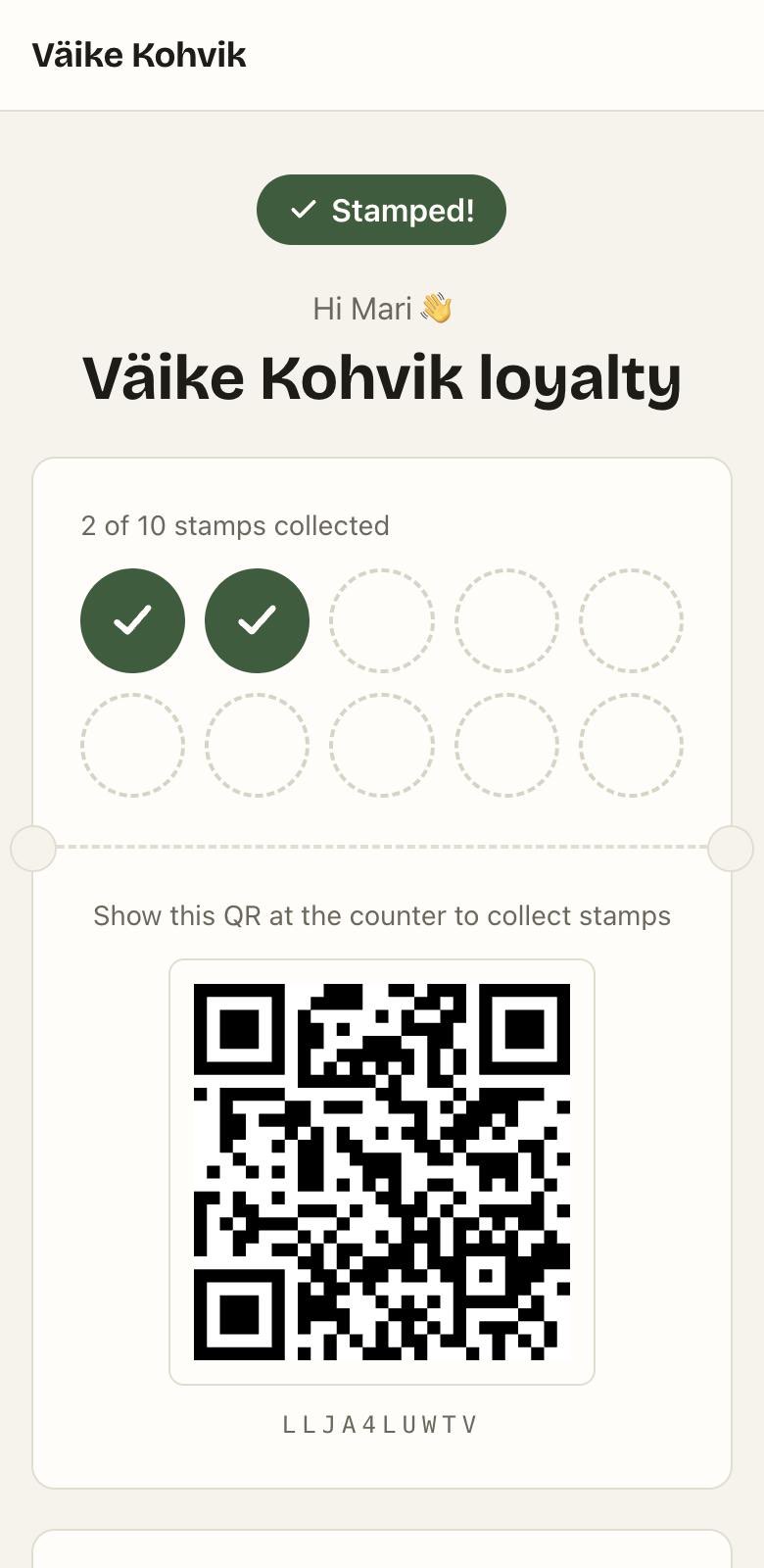 The first stamp is already on the card.The card shows the stamps so far and the reward waiting at the end.
- Their phone remembers the card.Next time, scanning the counter or door QR opens their own card.
- In Estonian, English, German and Polish.The customer's pages follow their phone's language.
- A client's card opens on their phone even with no signal, once it has been opened there before.Staff can still scan it.
At the counter
- Stamps from your phone: tap, they scan, done.Tap +1, or +4 for a round, and they scan the code on your screen.
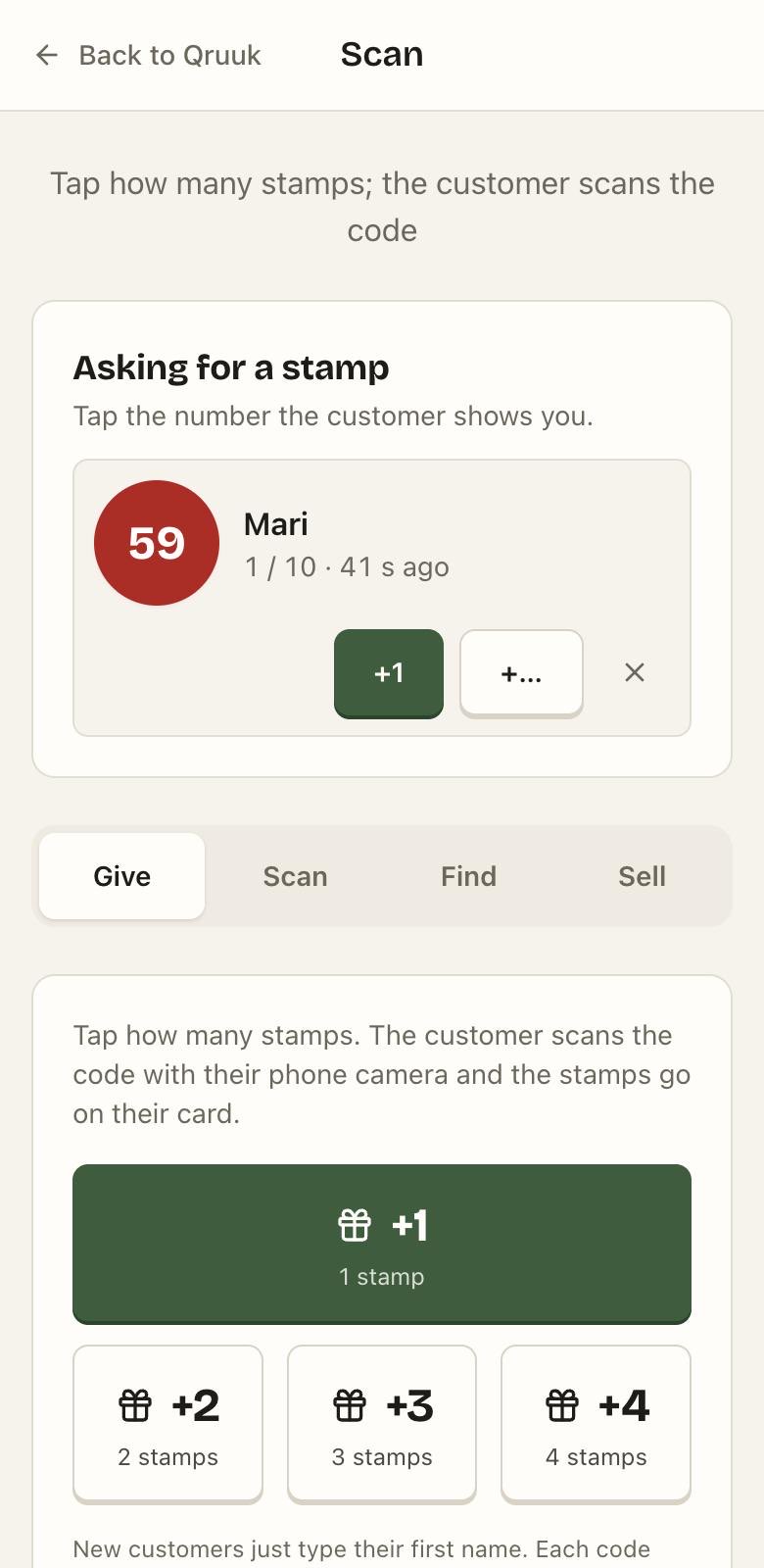 The customer scans, you tap +1.The same colour and number on both phones.
- Rewards count themselves. No paper cards, no cheating.A full card gives the reward once, and starts again.
- No hardware. A printed QR code and your phone.Print the counter card from the app.
- One screen with four tabs: give a stamp, scan, find a customer, sell.Selling is on Core.
- No signal at the door? Scanning keeps working and each scan is checked when the connection is back, counted once.Anything that didn't go through is listed for staff.
Running the business
- Free for up to 50 new cards and 200 scans a month.At the limits new stamps and cards pause. There is never a bill.
- First stamp in about three minutes.Timed from the sign-up form to a stamp at the counter.
- Every cardholder in one list, with who agreed to hear from you and who has not been back in 30 days.Search by name; filter the ones who stopped coming.
- Download the customers who agreed to marketing as a CSV, each with an unsubscribe link.Qruuk does not send campaigns itself.
- An overview of QR scans and class attendance.On the app's Overview screen.
- Invite another business: when it has given three customers a card, both get 30 days of Core free.Your invite link is in Settings.
- A month's sales as a spreadsheet for your bookkeeper, with totals per day and way of paying, or every sale, and the VAT split at your rate.On Pro.
Connections and your AI assistant
- Your AI assistant can set up and run your account.Claude, ChatGPT or Cursor, with one address. You tick what it may do.
- Connect Loyverse or Erply and till purchases stamp cards by themselves.A Loyverse refund takes the stamps back. On Core and Pro.
- An open API with keys, and signed webhooks to your spreadsheet, Zapier, Make or n8n.Each delivery is logged and retried.
- Every paid sale goes to Merit Aktiva by itself, as an invoice with its payment, under the same number. A refund goes as a credit note.On Pro: connect Merit Aktiva once under Settings → Accounting; each sale then shows its invoice number with a tick.
Your data
- Data is hosted on Google Cloud in Finland.You are the controller; Qruuk is the processor.
- Download everything in the account as a file, delete the account, and download or erase one client's data from their page.In Settings → Your data, and on the client's page.
What you won't get
- Cards in a phone wallet app are not switched on yet
- Messages pushed to customers
- A till or stock: Qruuk connects to your till
Salons and services
What your customers get, with no app
- Customers type a first name. No app, no password.They scan the QR and type a first name. The card opens in the browser.
- Punch cards and memberships that count down on their own.The card says VALID, 2 LEFT or EXPIRED, and why.
- Their phone remembers the card.Next time, scanning the counter or door QR opens their own card.
- In Estonian, English, German and Polish.The customer's pages follow their phone's language.
- Sell passes; clients pay on their phone. On CoreThe money goes straight to your own account at the payment provider.
- A client's card opens on their phone even with no signal, once it has been opened there before.Staff can still scan it.
Running classes
- Bring your members from a spreadsheet with the visits they have left or the date their membership runs to.Upload a CSV; their cards come with them.
At the counter
- Stamps from your phone: tap, they scan, done.Tap +1, or +4 for a round, and they scan the code on your screen.
- No hardware. A printed QR code and your phone.Print the counter card from the app.
- One screen with four tabs: give a stamp, scan, find a customer, sell.Selling is on Core.
- Record a cash or already-paid sale in one tap and the pass or ticket is issued.On Core.
- Show your IBAN and a reference; the buyer says they paid; you confirm when it arrives.On Core.
- Any amount: type it, show the QR, they pay on their phone. On CoreFor anything, on the price list or not. The Counter turns to PAID by itself.
- A QR for each product: print it or show it, they pay on their phone. On CoreA QR button on each package: print its card, or show it full screen on your phone.
- One QR for your price list: they pick and pay on their phone. On CoreThey scan one QR, see what is on sale and tap Buy.
- When a customer pays from a QR on their own, you get an email: what, who, and through which QR. On CoreOn by default; turn it off in Settings → Payments.
- Every team phone with notifications on gets a push for each sale paid from a QR: the amount, who, and what. On CoreOn phones where notifications are turned on in the app.
- Refund a sale from the app; the refunded pass stops working.On Core.
- Your own terms and refund policy on a public page, linked from booking and payment pages.Write them once in Settings.
- No signal at the door? Scanning keeps working and each scan is checked when the connection is back, counted once.Anything that didn't go through is listed for staff.
Running the business
- Free for up to 50 new cards and 200 scans a month.At the limits new stamps and cards pause. There is never a bill.
- First stamp in about three minutes.Timed from the sign-up form to a stamp at the counter.
- Every cardholder in one list, with who agreed to hear from you and who has not been back in 30 days.Search by name; filter the ones who stopped coming.
- Download the customers who agreed to marketing as a CSV, each with an unsubscribe link.Qruuk does not send campaigns itself.
- Invite another business: when it has given three customers a card, both get 30 days of Core free.Your invite link is in Settings.
- A month's sales as a spreadsheet for your bookkeeper, with totals per day and way of paying, or every sale, and the VAT split at your rate.On Pro.
Connections and your AI assistant
- Your AI assistant can set up and run your account.Claude, ChatGPT or Cursor, with one address. You tick what it may do.
- Connect Loyverse or Erply and till purchases stamp cards by themselves.A Loyverse refund takes the stamps back. On Core and Pro.
- Every paid sale goes to Merit Aktiva by itself, as an invoice with its payment, under the same number. A refund goes as a credit note.On Pro: connect Merit Aktiva once under Settings → Accounting; each sale then shows its invoice number with a tick.
Your data
- Data is hosted on Google Cloud in Finland.You are the controller; Qruuk is the processor.
- Download everything in the account as a file, delete the account, and download or erase one client's data from their page.In Settings → Your data, and on the client's page.
What you won't get
- One-to-one appointments and a calendar
- A till or stock
Events and one-offs
What your customers get, with no app
- Customers type a first name. No app, no password.They scan the QR and type a first name. The card opens in the browser.
- Clients check themselves in from their phone.At the door: scan the QR, press Check in, one visit comes off.
- In Estonian, English, German and Polish.The customer's pages follow their phone's language.
- Sell passes; clients pay on their phone. On CoreThe money goes straight to your own account at the payment provider.
Running classes
- Weekly classes that repeat eight weeks ahead, one-offs, places, a coach per class.Your week on one screen; a class is added once with its days.
- A full class stays full. No double bookings.The last place goes to one person, even when two press Book at once.
- A live list of who booked and who is there, with no-shows.Names fill in as people check in; add someone by name.
- A booking page for your Instagram bio.One address for your bio, and a QR for the door.
At the counter
- No hardware. A printed QR code and your phone.Print the counter card from the app.
- Any amount: type it, show the QR, they pay on their phone. On CoreFor anything, on the price list or not. The Counter turns to PAID by itself.
- A QR for each product: print it or show it, they pay on their phone. On CoreA QR button on each package: print its card, or show it full screen on your phone.
- One QR for your price list: they pick and pay on their phone. On CoreThey scan one QR, see what is on sale and tap Buy.
- When a customer pays from a QR on their own, you get an email: what, who, and through which QR. On CoreOn by default; turn it off in Settings → Payments.
- Every team phone with notifications on gets a push for each sale paid from a QR: the amount, who, and what. On CoreOn phones where notifications are turned on in the app.
- Your own terms and refund policy on a public page, linked from booking and payment pages.Write them once in Settings.
Connections and your AI assistant
- Your AI assistant can set up and run your account.Claude, ChatGPT or Cursor, with one address. You tick what it may do.
Your data
- Data is hosted on Google Cloud in Finland.You are the controller; Qruuk is the processor.
Coaches and teams
Running classes
- Who taught what, and what they earned.A monthly report per coach: classes, visits, euros and their share. Download it as a CSV.
Running the business
- Invite coaches and staff. Staff see the schedule, rosters and the Counter, not money or settings.Seats: 1 on Free, 5 on Core, 15 on Pro.
Connections and your AI assistant
- Your AI assistant can set up and run your account.Claude, ChatGPT or Cursor, with one address. You tick what it may do.
- An open API with keys, and signed webhooks to your spreadsheet, Zapier, Make or n8n.Each delivery is logged and retried.
Your data
- Data is hosted on Google Cloud in Finland.You are the controller; Qruuk is the processor.
- Download everything in the account as a file, delete the account, and download or erase one client's data from their page.In Settings → Your data, and on the client's page.
What you won't get
- Paying coaches: Qruuk works out the sums, you pay
- Two-step sign-in for your team
Your stall, without the terminal.
Start free. Selling needs Core.
Start freeWill Qruuk fit your business?
Tell us what you do, or give us your website. We email you what Qruuk would set up for you, what it won't do, and what it costs. Often nothing.
Check your inbox. The link in the email shows your proposal. It can take a minute.
Start free
Or tell us what you do: hello@qruuk.com